
.png)


How To Download Youtube Videos ?
Now when Youtube is blocked in some countries. People often use proxy tools (Ultrasurf, Hotspot sheild or hide ip). Then many people are facing issues while download from youtube by IDM . Because IDM needs to be configured to download youtube videos when on proxy.
Youtube Downloader Steps
if you haven’t install IDM then first you need to install it. You can download IDM from below button.

Make sure IDM is registered. You can follow steps in read me document of its folder.
Run Ultrasurf and wait until it is connected.
Open IDM and go to Option button.
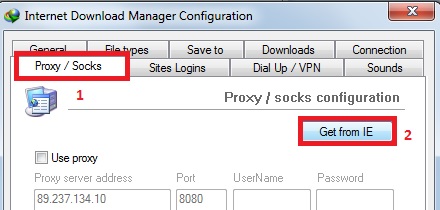
Then press OK and Close the options.
Now Open Youtube in browser.
You’ll see IDM link on corner of youtube video . Click it and youtube video downloading will begin successfully.
If you hit any issues while downloading video from youtube let me know.
Disclaimer: Note that in general, downloading other people’s videos posted on YouTube is not allowed. It is illegal. However, you can legally download your own uploads with above method.
Thanks For Visit ProbAns.blogger.com



0 comments:
Post a Comment